
This integration supports content discovery allowing Mine to scan for PII inside your ServiceNow ITSM instance.
Mine will discover PII regarding resources including incidents, users, problems, change_request and custom tables.
Before you start
- Make sure your MineOS plan supports integrations
- Make sure you are able to create an api key in ServiceNow
- [Optional] Enable Preview mode to view sample PII values alongside classification results. The sample values are stored encrypted and automatically deleted after 7 days. You must enable Preview mode before running the scan to see sample values. For more information about how to set up Preview mode go here.
Setting up the API key on ServiceNow
To connect the ServiceNow ITSM integration, follow the steps below:
Make sure have API Key plugin installed
First, navigate to All > Admin Center > Application Manager and verify the plug API Key and HMAC Authentication (com.glide.tokenbased_auth) is activated. It should be, but for some reason if it isn't, go ahead and activate it.
Create the Inbound Authentication Profile
- Navigate to All > System Web Services > API Access Policies > Inbound Authentication Profile
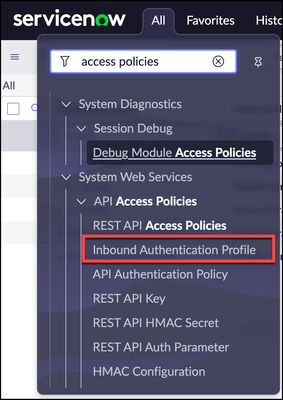
- Click New
- Click Create API Key authentication profiles
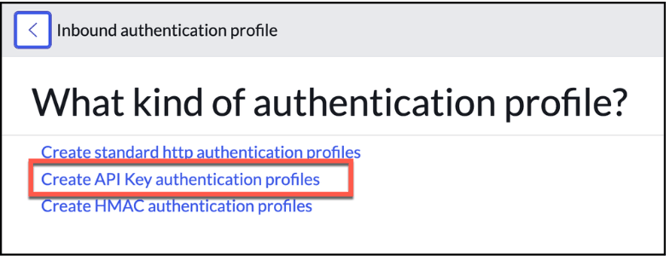
- Provide a descriptive name in the Name field
- In the Auth Parameter field, add Auth Header record for x-sn-apikey. mine only suppors Auth Header and uses x-sn-apikey by default
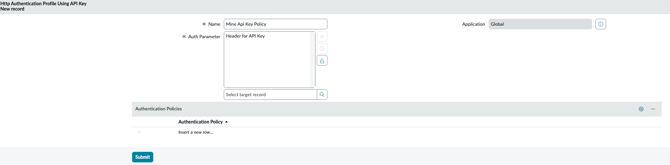
- Click Submit
The API Access Policy
- Navigate to All > System Web Services > API Access Policies > REST API Access Policies
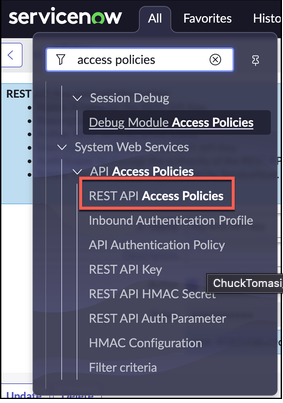
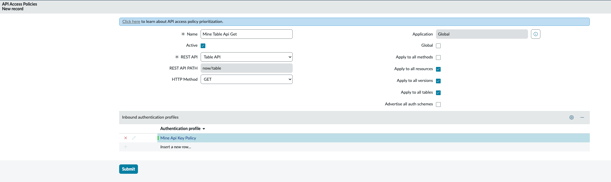
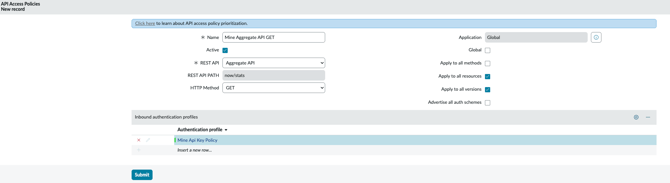
- We need to have 2 policies:
-
- GET Access to all Table Api + connection to the Access Policy
- GET Access to Aggregate API + connection to the Access Policy
- GET Access to all Table Api + connection to the Access Policy
Create the REST API key
- Navigate to All > System Web Services > API Access Policies > REST API Key
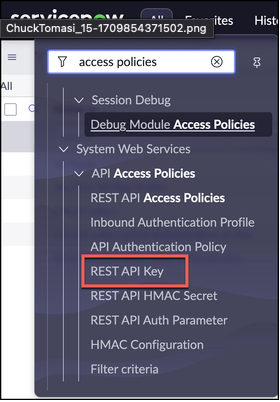
- Click New
- Provide a descriptive name and select a user. the user must have read access to tables + aggregate API
- Use the form menu and choose Save
- The system generates a token and saves it in the Token field. To see the token, use the lock icon and copy it.
Using the API Key in Mine
- Log in to your Mine account, click Inventory and search for ServiceNow ITSM. if it doesn’t exist in your inventory click on “Add data source”
- Click on “integrations” on the left side navigation
- Select an Integration, and Mark “Scan this source using Data Classifier”
- Enter your API Key
- Enter the instance name - it will be from the service now url: “https://{instance}.service-now.com”
- Optional Inputs:
- Custom API Key header - default is “
x-sn-apikey” - API Version - you can pick v1, v2 or latest, default is latest
- Table Allowlist - restricts the scan to specific tables. Accepts a comma-separated list of exact table names (e.g. table1, table2) or a regex pattern (e.g.
^u_cmdb_ci_). Regex uses partial matching — use^and$anchors for exact names (e.g.^incident$). Leave empty to scan all tables.
- Custom API Key header - default is “
- Click on “Test your integration” and verify you see the “Connected” green icon
- Click on “Test & Save”
- Click on "Start scan" to initiate PII classification across all ServiceNow ITSM tables, or only the tables matching the Table Allowlist if one is configured.