
What is the transfer Agent?
The TIA Agent is a Mira AI agent that continuously reviews the systems in your inventory to determine whether a Transfer Impact Assessment (TIA) is required.
It analyzes information such as:
-
System server location
-
Company headquarters
- Your company profile including your location, your employees' location and more.
-
Your data subject locations (employees or customers)
When the agent detects a cross-border transfer that requires additional safeguards, it can automatically:
-
Create a new TIA assessment or confirms there's one in place.
-
Confirm when a TIA is not required
-
Flag missing information that prevents a decision
By automating these checks, the TIA Agent helps privacy teams:
-
Ensure all systems are evaluated for international transfer risk
-
Maintain up-to-date TIAs without manual monitoring
-
Identify missing data that could block compliance decisions
The agent runs continuously in the background, reviewing systems as your inventory evolves.
Where to Find It
Go to: Inventory → Mira AI Agents → Transfer Agent
From this page you can:
-
Configure the agent
-
Run test evaluations
-
Activate automatic monitoring
-
Review results and reasoning for each system
1. Configure the Agent
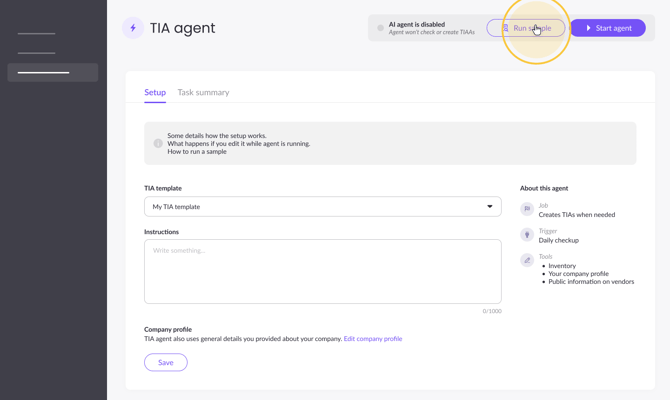
Before activating the agent, select the TIA template that will be used when a new assessment is created.
The agent also uses information from your Company Profile, make sure the following is included:
-
Headquarters location
-
Data subject locations (employees and/or customers)
-
Business context
You may optionally add instructions to guide the agent's evaluation logic. Example: “Create TIAs only for transfers outside the EEA unless the vendor is certified under the EU-US Data Privacy Framework.”
2. Run a Test Sample
Before enabling the agent, you can test it on up to five systems.
This allows you to verify how the agent evaluates systems and review the reasoning behind its decisions.
Steps:
-
Click Run sample
-
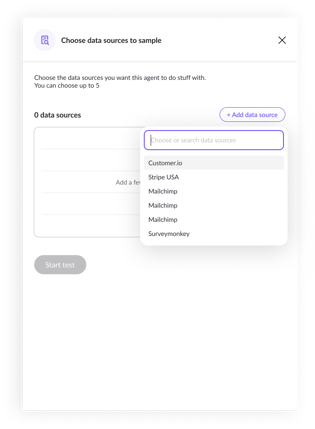
Select up to 5 systems
-
Start the sample run
Each system produces a task result showing whether:
-
A TIA is required
-
A TIA is not required
-
Additional data is needed
3. Activate the Agent
Once you confirm the results look correct, click Start Agent.
After activation:
-
The agent runs automatically every day
-
Each system in your inventory is evaluated
-
Results are recorded as agent tasks
The agent continuously checks whether systems require new TIAs based on updated data.
Task Results and Statuses
Every system evaluated by the agent generates a task result.
Each task includes:
-
The system evaluated
-
The agent's decision
-
Detailed reasoning
-
Links to related systems and assessments
-
A history of previous runs
Possible Task Outcomes
TIA Created / In place
The agent determined that a cross-border transfer requires a TIA and automatically opened an assessment using your selected template.
OR the agent determined a TIA is needed but already in place for this use case and therefore will not open another assessment. You can find the already opened assessment in the linked assets.
Example reasoning:
-
Data subjects located in the EU
-
System servers located in China
-
No adequacy decision exists
- No DPF certification
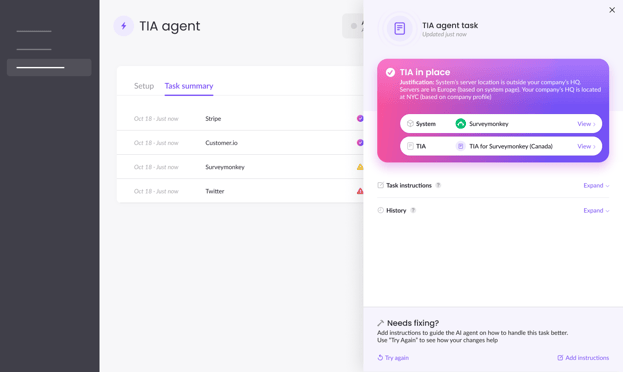
When a TIA is in place you'll find a direct link to the assessment opened by the agent in the linked assets.
TIA Not Needed
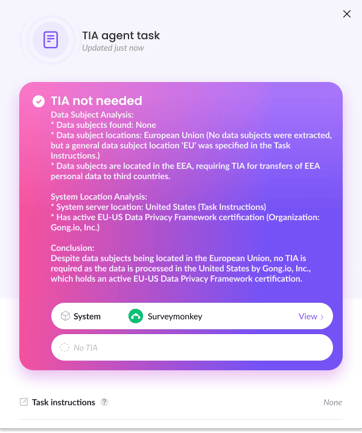
The agent determined that no TIA is required.
Example:
-
Data processed within the same region
-
Vendor covered under the EU-US Data Privacy Framework
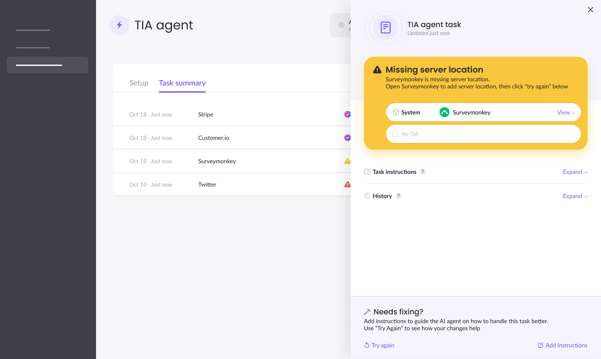
Undetermined (Missing Information)
The agent cannot determine whether a TIA is required due to missing information.
Common missing fields include:
-
Server location
-
Data subject location
-
Processing activity details
The task will explain exactly what data is missing so it can be corrected.
There might be multiple pieces of information missing.
Task History
Each time the agent evaluates a system, the run is recorded.
The history shows:
-
Date and time of each run
-
Decision made
-
Reasoning summary
If a system's information changes, you can re-run the task and compare outcomes.
Fixing Missing Information
If a task shows Undetermined, the agent will explain what information is missing.
Common examples include:
1. Unknown server location
The system record does not contain server hosting information.
To Fix:Go to the System page → Server Locations and update the field.
2. Unknown data subject location
The agent could not determine where employees or customers are located.
To Fix: Update your Company Profile or related processing activities.
Once updated - you can either wait for the agent to update the status on its next run or run it manually by clicking "Try again" in the task page
Rerunning a Task
You can rerun the agent for a specific system at any time.
Use this when:
-
System details were updated
-
Data locations changed
-
You want to confirm a previous result
When rerun:
-
The task briefly enters a loading state
-
The agent evaluates the system again
-
The latest decision replaces the previous task status
-
A new run is added to the task history
How TIAs Created by the Agent Appear
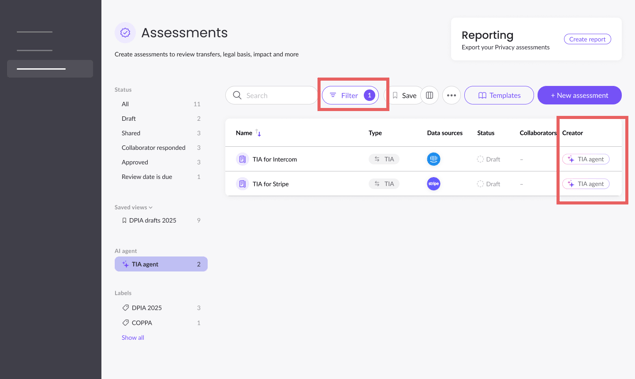
When the agent creates a TIA:
-
The assessment appears in the Assessments table
-
It is labeled Opened by Agent
-
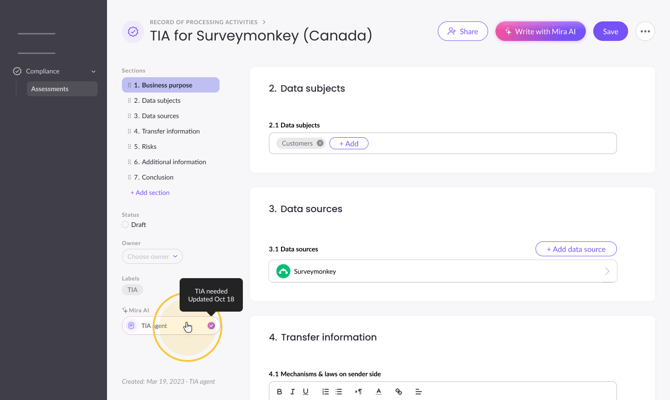
The task that generated the assessment is linked for audit visibility
This allows teams to trace why the assessment was created.
Company Profile (AI Context for All Agents)
The Company Profile provides critical context used by all Mira AI agents.
Keeping this information accurate improves agent decisions.
Recommended fields include:
-
Company name
-
Company description
-
Business model (B2B, B2C, etc.)
-
Headquarters location
-
Employee locations
-
Customer locations
-
Industry
-
Company size
-
Key services or products
-
Regulatory scope (GDPR, HIPAA, DORA, EU AI Act)
Accurate company context helps the TIA Agent determine where personal data originates and where it is transferred.
For more information read the business details article here.
Tips & Best Practices
-
Ensure system server locations are filled
-
Keep your Company Profile updated
-
Run a sample before activating
-
Review missing data tasks regularly
FAQ
1. Does the TIA Agent delete or modify existing TIAs?
No.
The agent only creates new assessments when needed. It does not delete or modify existing ones.
2. Can I stop the agent after activating it?
Yes.
You can disable the agent at any time from the Transfer Agent page.
3. Can the agent evaluate systems again after changes?
Yes.
You can rerun a task manually or wait for the next automatic evaluation.
4. What happens if a TIA already exists?
The agent detects existing assessments and will not create duplicates.
5. What if the agent cannot determine whether a TIA is required?
The task will be marked Undetermined and will explain exactly which data is missing.
Once the missing fields are filled, the task can be rerun.