
This integration lets MineOS automatically handle data access, preview, and deletion requests for candidates in your Greenhouse account.
Deprecation note: Harvest API v1 and v2 will be deprecated and unavailable after August 31, 2026. Please make sure that your use this integration, Greenhouse v3, that uses the latest version of Harvest (v3) by this date.
What this integration does?
- Copy requests (access)
- Deletion requests are automated by anonymizing the customer’s Candidate object
- Preview
Before you start
- Make sure your MineOS plan supports automatic integrations.
- Make sure you have the permissions to create an API key on your Greenhouse account.
Setting up
To connect the Greenhouse integration, follow the steps below:
Step 1: Add Greenhouse as an Integration in MineOS
-
In MineOS, go to the Inventory
-
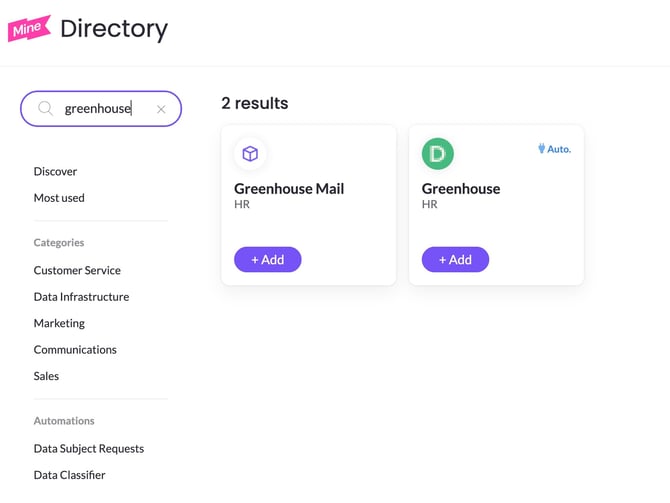
Click on Add data source, find Greenhouse and click Add
-
Go back to the Inventory, find Greenhouse and open it
-
Navigate to DSR & integrations tab
- If you have an existing Greenhouse integration, click on Add instance. If you don't have an existing integration configured, move to the next step.
-
Under Action for fulfilling requests select Integration
-
In the Integration Type dropdown, choose Greenhouse v3
- Click Set up integration — this launches the configuration wizard
Step 2: Get Your Greenhouse Credentials
You'll need a Client ID and Client Secret from your Greenhouse admin. Only a Greenhouse admin can create these, so send them this exact request:
"I need you to create a new Harvest API credential for our MineOS data privacy integration. Please:
Go to the gear icon (Configure) → Dev Center → API Credential Management
Click Create New API Credentials
For API type, choose Harvest v3 (OAuth)
Under permissions, turn ON only these two:
GET Candidates (List Candidates)
PATCH Anonymize Candidates
Save it, then click "I have stored the client credentials" — this reveals the Client ID and Client Secret. Greenhouse only shows the secret once, so copy both down immediately.
Send me the Client ID and Client Secret securely (not over regular email/Slack — use a password manager or secure share)."
Only those two permissions are needed — this integration just looks up a candidate's info and anonymizes it on request, so limiting access to exactly that keeps the credential as low-risk as possible.
Once you have the Client ID and Client Secret, continue to Step 3.
Step 3: Follow the configuration Wizard
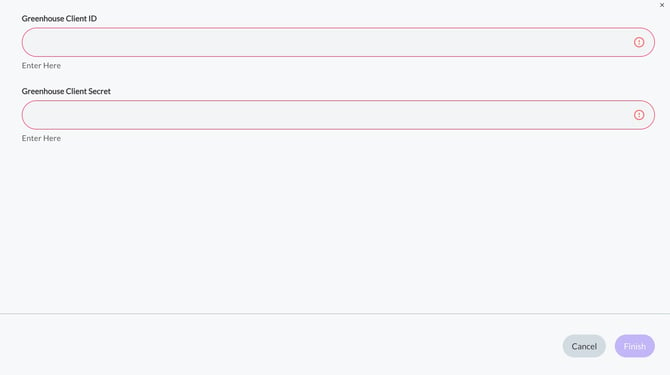
The wizard will prompt you to enter:
-
Greenhouse Client ID - The Client ID from your Greenhouse admin
-
Greenhouse Client Secret - The Client Secret from your Greenhouse admin
Everything else is pre-set — you don't need to change it. Finish the wizard to activate the integration.
How to Test It
-
Save your credentials
-
Send a test request (Preview, Copy, or Delete) for a candidate email you know exists in Greenhouse
-
Confirm you get a success response back
Need Help?
If requests are failing, double-check your Client ID and Secret with your Greenhouse admin — that's the most common issue. For anything else, reach out to your CSM.